

AppConductor is MEMC Consultancy’s application lifecycle management platform — built to take the guesswork and inconsistency out of packaging, testing and deploying software across an enterprise estate.

The main Workload Tab unique to the engineer.
What It Was Designed For
Every enterprise IT team eventually hits the same problem: applications get packaged and deployed differently depending on who is doing the work and when. Naming conventions drift, testing gets skipped under time pressure, and nobody has a single view of what state a given application is actually in.
AppConductor was designed to fix that. It gives every application request a single, structured path from intake to retirement, so packaging, QA, user acceptance and deployment are always carried out the same way — regardless of which engineer picks up the work.
Migration Projects
Migration projects — Windows 10 to 11, SCCM to Intune, an OS refresh, or estate consolidation after an acquisition — typically involve re-packaging hundreds or thousands of applications in a short window. That’s exactly the scenario AppConductor is built for.
Instead of tracking application status across spreadsheets and multiple packagers, every application in a migration moves through the same lifecycle, with a full history retained at each stage. Project leads get real-time visibility into what’s packaged, what’s in QA, what’s approved, and what’s actually deployed — without chasing updates manually.

Business as Usual
AppConductor isn’t just for big migration pushes — it’s the same process teams use for everyday, business-as-usual application requests. A new software request, a vendor update, or a one-off packaging job all flow through the same pipeline as a large-scale migration.
That consistency is the point. When every request, big or small, follows the same stages and the same quality gates, standards don’t slip once a project ends and the pressure is off. What gets built during a migration becomes exactly how the team keeps working afterwards.
The AppConductor Lifecycle
Every application request moves through the same set of stages, with a full audit trail recorded at each step:
The complete process

1. New Software
An application is requested and enters the pipeline

2. Queued
Request is prioritised and software obtained & added to the AppConductor library. Once complete it is allocated to an engineer.

3. Engineer informed
Engineer will receive a message that a new assignment. Once acknowledged it then transfers to their workload and changes status to Queued

4. Discovery
Here the requirement are analysed for dependencies, middleware etc…The most important process as all other processes link to the data discovered here.
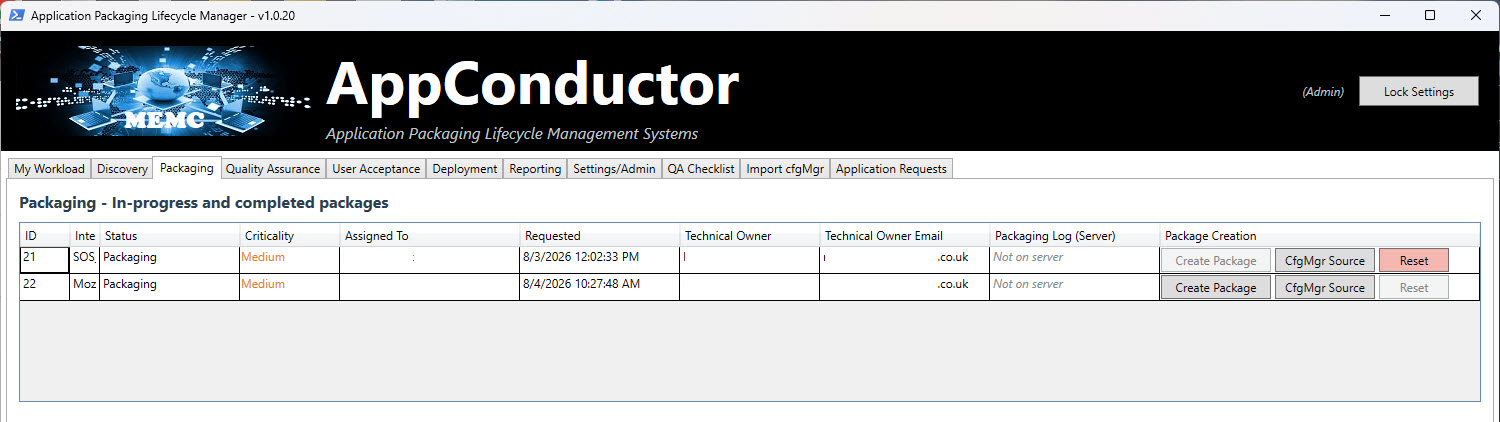
5. Packaging
The application is packaged to a standard, repeatable template, using all the data captured during Discovery.

6. AppComposer
Here you choose what to package: an SCCM package alone — which automatically configures the application, deployment type, detection rules and dependencies captured during Discovery, along with the collection and its query rules based on your organisation’s standards — or an Intune package, which creates the Intune groups, the .intunewin package and the deployments to those groups, all using your configured naming standards. Both are built through our companion tool, AppComposer.

7. Packaging
Progress is monitored live in AppConductor, which surfaces any errors that occur during packaging.

8. Quality Assurance
The package is Quality Assured and checked against company standards for documentation, functionality, install, uninstall and detection criteria.

9. User Acceptance
The business signs off that the application behaves as expected.

10. Deployment
The package is rolled out through SCCM or Intune to target devices.
Get in touch to find out how AppConductor could support your next migration — or simply bring more consistency to business-as-usual application requests.